

The AI agent for outbound sales
Outbound that
runs itself. You stay in charge.
Dojobat finds the right people, writes to each of them from your own mailbox, answers replies with your booking link and learns what works. You decide how much it does without asking.
One plan, $300 a month. Access is by invitation for now.


- Every draft shows the angle the agent chose for that person, and why the writer wrote it.
- Approve it, edit it, or ask for a rewrite in plain words, like “shorter”.
- It goes out as plain text from your own address, and follow-ups stay in the thread.
How it works
From a description of your customer to a booked meeting.
You describe who you sell to and what you sell. The agent works through the outbound one person at a time, and you can read every step.
Find
Describe your customer in plain English. It searches Apollo, checks who matches and screens each lead for fit before spending a credit.
For example: Ops leaders at mid-size logistics companies
Plan
For each person it picks an angle, a priority and a time to write in their timezone. Some go first, some wait.
For example: Lead with time lost to shipment exceptions
Write
A copywriter model writes every email from your product, your ideal customer and what is known about the person.
For example: 78 words, plain text, one clear ask
Send
From your own mailbox, inside your send windows and daily limits, with follow-ups in the same thread.
For example: Mon to Fri, 09:00 to 17:00, their time
Reply
It reads replies, stops the sequence and briefs an answer that offers your booking link and times that suit them.
For example: Interested: booking link and two times
And it learns. Once a week, when there is enough to go on, it looks back at what got replies and how your team edited its drafts, and writes down what it learned for next time.
Control
You decide how much it does on its own.
Pick a level for the workspace and change it whenever you like. Copilot is where it starts: it does the legwork, and launches and live changes wait for you.
Observe
It reads, plans and suggests. Every change waits for you.
Copilot
DefaultIt sources, plans leads and briefs drafts on its own. Launches and live campaign changes wait for you.
Autopilot
It also launches and adjusts live campaigns within safe limits. Products and goals still wait for you.
| What it wants to do | Observe | Copilot | Autopilot |
|---|---|---|---|
| Safety: stop contacting someone, pause a campaign | On its own | On its own | On its own |
| Find more leads on Apollo | Asks you | On its own | On its own |
| Plan leads: angle, priority, timing, outcomes | Asks you | On its own | On its own |
| Brief, review and redraft emailsIt never approves a draft. | Asks you | On its own | On its own |
| Set up new ICPs and draft campaigns | Asks you | On its own | On its own |
| Change live campaigns and ICPs in use | Asks you | Asks you | Within limits |
| Launch campaigns | Asks you | Asks you | Within limits |
| Set goals | Asks you | Asks you | Asks you |
Autopilot’s limits: at most 50% more people a day, two launches a week and one settings change per campaign a day. Anything bigger comes to you as a proposal.
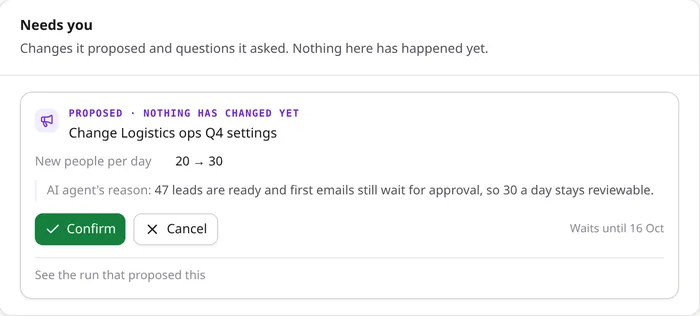
When it asks, you get a card. It says what it wants to change and why. Nothing happens until someone on your team confirms it, and a note on a cancelled card is read on its next run.
Always a person, at every level
The agent has no tool for any of these, so no level and no instruction can hand them over.
- Switching a campaign to Autopilot, which lets email go out without approval
- Approving drafts
- Mailboxes, team members, API keys and budgets
- Taking anyone off the do-not-contact list
- Deleting anything
It never sends email itself and never chooses who gets one. Sending is done by the automation, with every check in place: suppression, limits, send windows and pacing.
Transparency
Every run, written down. Down to the cent.
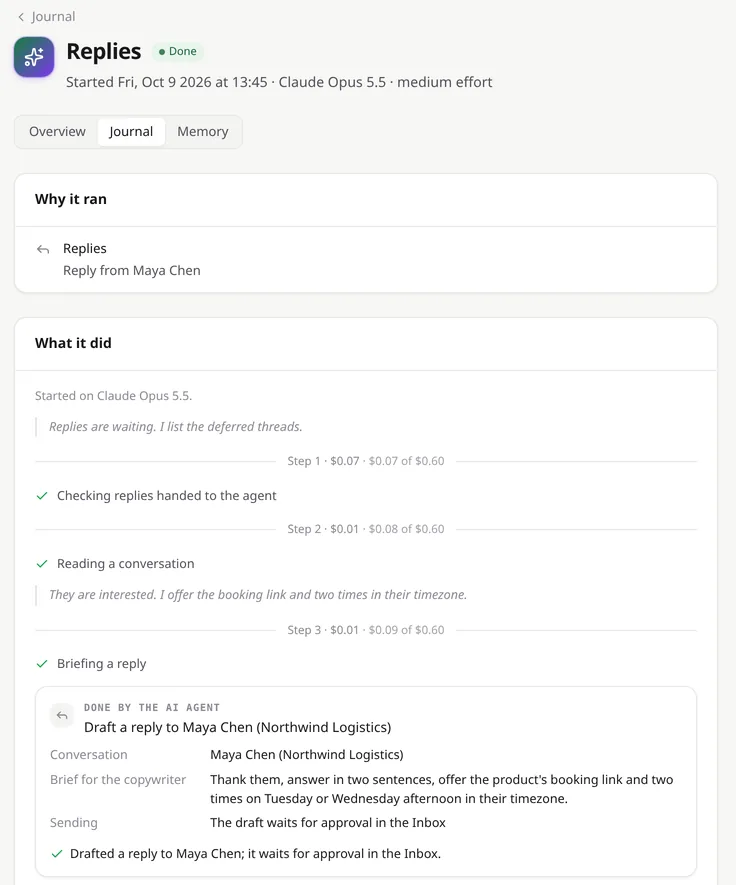
The journal shows why each run started, what the agent looked at, what it decided and what it cost. Every change it makes is in the audit trail as the AI agent, with a link to the run.
Reasoning you can read
Short summaries of its thinking at each step, beside every tool it used and every change it made.
A price on every run
Each run has its own cap and the workspace has a monthly budget. When the budget runs out, runs stop cleanly and the rest keeps going.
Ask it why
A chat on every page: why it skipped someone, what it did today, or what it would change.
Stop it any time
Stop a run, pause the agent for the workspace, or take one campaign out of its hands.
Built in
The parts of outbound that should never slip.
Safety and teamwork are part of the product, not settings to remember.
Your own mailbox
Google Workspace, Microsoft 365, Fastmail, Zoho or any SMTP and IMAP account. It only downloads replies that belong to its own conversations.
A shared inbox
Drafts, replies and conversations in one place for the team, with roles for owners, admins and members.
Suppression that holds
Bounces and unsubscribes are suppressed on their own, and a do-not-contact list covers addresses and whole domains.
Limits enforced in code
Daily caps, send windows and pacing per mailbox. Nobody is contacted again across campaigns within a cooldown.
Breakers
A campaign pauses on its own if more than 5% of its emails bounce, or more than 15% of people opt out or complain.
An audit trail
Every action by the agent, a teammate, a prospect or the system, with who did it and when, per conversation and campaign.
Pricing
One plan. Everything in it.
Apollo data, the copywriter and the AI agent are included, so there are no other accounts to open or keys to buy.
Need higher limits? Say so when you get in touch. Limits are set per workspace and can be raised.
$300a month
For one workspace and its team.
- 50 cold emails a dayFirst emails and follow-ups together
- 100 enrichments a monthVerified work emails and company details
- 200 Apollo searches a dayFinding and previewing who matches
- 1 million copywriter tokens a monthEvery email and reply drafted
- $25 of AI agent usage a monthUp to 30 runs a day, or bring your own Anthropic key
- 2 connected mailboxesSending from your own addresses
- 5 team membersOwners, admins and members
- Shared inbox, journal and audit trailFor everyone on the team
FAQ
Plain answers.
The questions teams ask before they hand over their outbound.
Which mailboxes does it send from?
Your own. Connect Google Workspace, Microsoft 365, Fastmail, Zoho or any account with SMTP and IMAP; for Google you use an app password. Emails go out as plain text from your real address, and Dojobat only downloads the replies that belong to its own conversations.
Where do the leads come from?
Apollo. Dojobat does the searching and enrichment on its own Apollo account, counted against your plan, so you don't need an Apollo subscription. New leads are screened for fit before an enrichment credit is spent on them.
Will it email people without asking me?
Only in campaigns where someone on your team switched on Autopilot. Everywhere else, every email waits in the inbox to be approved, edited or discarded. The agent can't switch Autopilot on and can't approve its own drafts.
Which AI does it use?
The agent runs on Claude, by Anthropic, and a smaller Claude model screens new leads. A separate copywriter model writes the emails. The plan includes $25 of agent usage a month, and a workspace can use its own Anthropic key instead, in which case that budget doesn't apply.
What happens to our data?
Each workspace is separate, and only its members can see its contacts and conversations. Mailbox passwords and API keys are stored encrypted. With your own Anthropic key, your Anthropic account's terms cover what the agent sends to it.
How do I stop it?
Stop a single run, pause the agent for the whole workspace, or take one campaign out of its hands. Without the agent, the automation carries on with your campaign settings, and any campaign can be paused.
Can I cancel?
Yes. The plan is monthly, with no long contract.
How do I get started?
Request access with your work email. Once you're let in, you sign in with a link we email you (no password) and set up your workspace: a mailbox, what you sell and who you sell to.
Start on Copilot. Promote it when it has earned it.
One plan, $300 a month, with Apollo data, the copywriter and the AI agent included.